You can play comfortably only when the game is customized to the needs of the gamer. If the language and visual design are constantly reset to default parameters, then the gameplay turns into torment.
В Cyberpunk 2077 there are a large number of problems with the settings and optimization of the game. Force the game not to crash during startup or raise FPS - this is already a test. However, many players have had problems with simpler processes as well. Some gamers cannot turn off subtitles, while others constantly lose their language settings. All these problems have a solution, and we are happy to share it.
How to remove subtitles in Cyberpunk 2077
Even before the release of the game, the developers promised flexible subtitle settings in Cyberpunk: brightness, size and even color palette. Unfortunately, at the time of the release of the project this option has not been implemented. In addition, you will not find the “subtitles” item itself in the settings. In Russian localization it was called "Background conversations».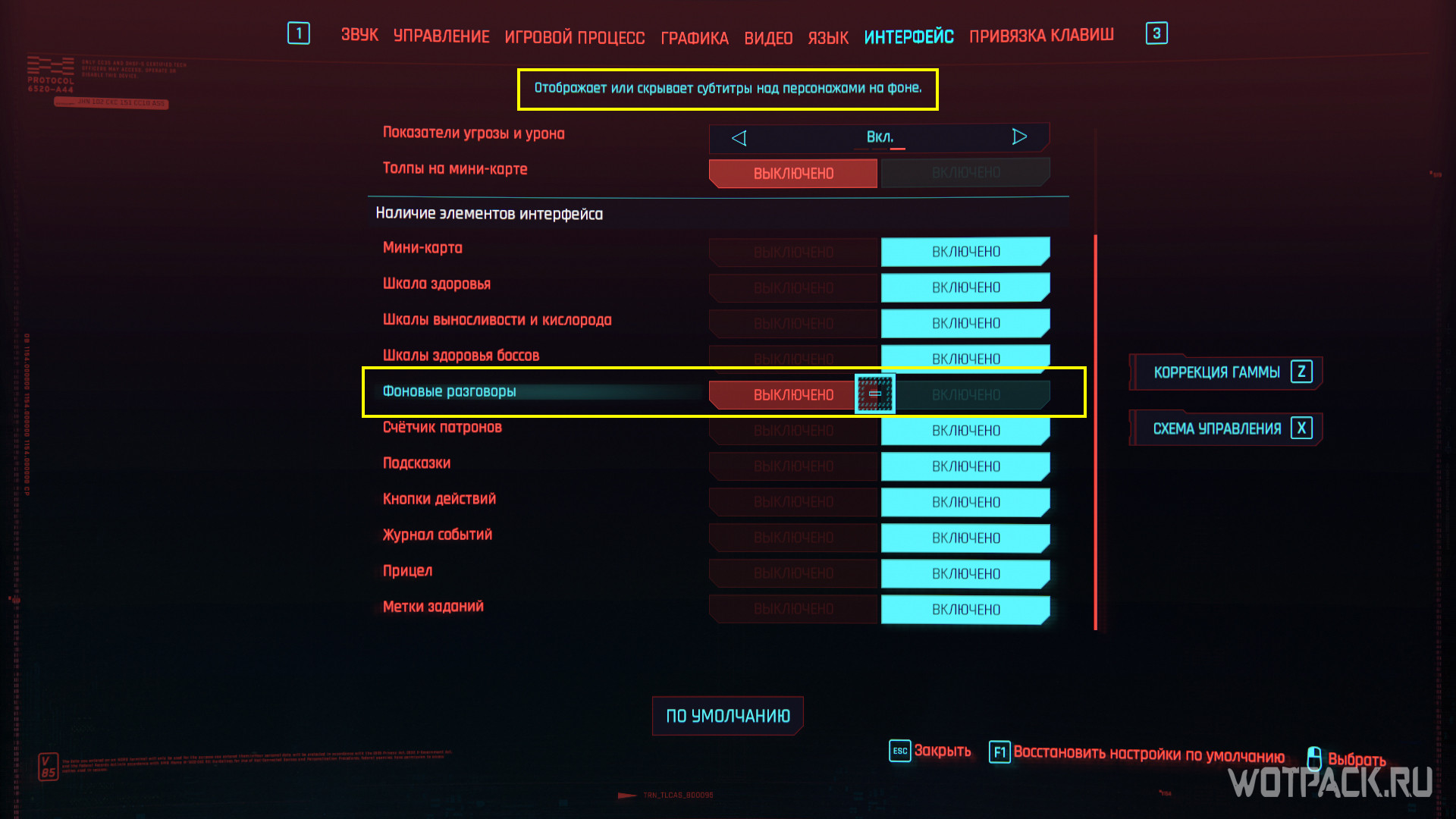
To disable subtitles in Cyberpunk 2077 you need to open the "Interface" tab in the settings and find the item "Background conversations" there. Click on the button next to it to remove the text display of the characters' phrases from the game. By turning off Background Conversations, you can get rid of the text above the heads of the characters, who are talking to each other next to V without involving him in the dialogue. You can't turn off subtitles for V's dialogues with other characters.