Graphics settings determine stability Gothic 1 remake, making the world of Khorinis smooth and responsive, or turning gameplay into constant freezes that put excessive strain on the system. Inappropriate settings for the PC's capabilities lead to sudden frame drops and lag, which instantly destroy immersion and make combat more challenging.
Most issues can be resolved by disabling resource-intensive processes or selectively reducing quality if you want to achieve the optimal balance between image quality and performance. Before making any adjustments, it's worth checking whether your system configuration meets the remake's requirements, significantly lags behind them, or, conversely, exceeds them.
Gothic 1 Remake system requirements
The game's Steam page provides information on the minimum and recommended requirements that will allow you to play without noticeable freezes:
| Parameters | The minimum | Recommended |
| OS | Windows 10 64bit / Windows 11 64bit | Windows 10 64bit / Windows 11 64bit |
| Processor | Intel Core i7-7700K / AMD Ryzen 5 1600X | Intel Core i7-7700K / AMD Ryzen 5 3600X |
| RAM | 16 GB RAM | 32 GB RAM |
| Video card | 8 GB VRAM, AMD RX 6700 XT or NVIDIA GeForce RTX 2070 | 12 GB VRAM, Nvidia GeForce RTX 3070 Ti or AMD Radeon RX 6800 XT |
| DirectX | 12 | 12 |
| Disk space | 60 GB | 60 GB |
Optimal graphics settings to increase FPS
If your computer doesn't meet the recommended system requirements, you'll need to significantly lower most settings using the preset for low-end PCs. Owners of more modern devices should pay attention to the far right column, which displays the best settings for balancing system load and image quality.
| Parameter | For weak PCs | For powerful PCs |
| Display mode | Fullscreen | Frameless window |
| Resolution | Native monitor resolution | Native monitor resolution |
| Temporal scaling | DLSS/FSR/XeSS | DLSS/FSR/XeSS |
| Scaling quality | Performance | Quality |
| Lighting quality | poor | Secondary |
| Shadow quality | poor | Secondary |
| Foliage quality | poor | high |
| The meaning of draw distance | Secondary | high |
| Reflection quality | poor | Secondary |
| Post-processing quality | Secondary | Secondary |
| Texture quality | Secondary | high |
| Effect quality | Secondary | high |
| Shading quality | poor | Secondary |
| Landscape quality | Secondary | high |
| Wind effect quality | poor | high |
| Motion blur intensity | 0 | 0 |
| Glow intensity | 70 | 70 |
| Depth of field correction | 70 | 70 |
| Shading intensity | 70 | 70 |
| Sharpness level | 40 | 40 |
What to do if FPS still drops
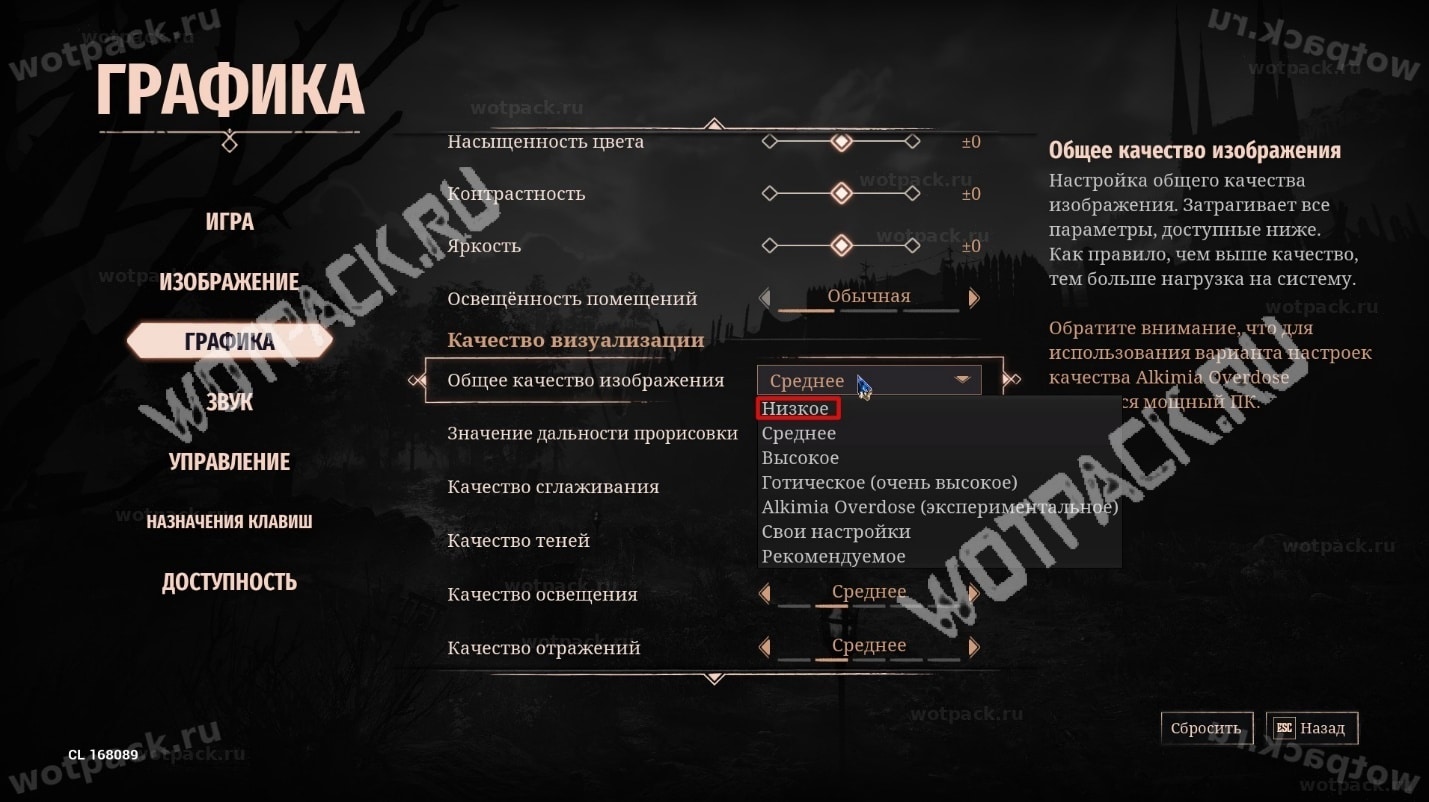
If the game is lagging despite the settings for low-end PCs, use the preset below. It reduces the load by disabling heavy post-processing and lowering the most resource-intensive settings.
| Parameter | Value |
| Scaling quality | Performance |
| Shadow quality | poor |
| Foliage quality | poor |
| The meaning of draw distance | poor |
| Post-processing | poor |
| Wind effect quality | poor |
| Vertical sync | Turned off |
How to remove soap
On high-end systems capable of running the game at the recommended specifications, you can use configurations for higher-quality graphics. These require significantly more power but improve the quality of shadows, reflections, and textures.
| Parameter | Value | Impact of improvement |
| Lighting quality | Gothic | Maximum depth and realistic darkened corners. |
| Shadow quality | High or Gothic | Clear shadows. |
| Foliage quality | high | Increases density. |
| The meaning of draw distance | High or Gothic | Eliminates visible protrusions and polygons at a large distance. |
| Reflection quality | high | The image in reflections is more consistent with other objects. |
| Texture quality | Gothic | Smooth and well-defined surfaces, detailed objects. |
| Effect quality | high | Adds dynamic particles when using magic. |
| Wind effect quality | high | Makes the environment more realistic due to visible air flows. |
To get an extra 10-15 frames per second in the Gothic remake, disable resource-intensive settings that you don't pay much attention to, such as reflections, shadows, and draw distance. These settings can impact overall immersion, but for optimization purposes, they can be ignored.