

Tired of seeing the text “Sorry, this product is not available in your region” in front of you? Tired of uncertainty and frustrated by the inability to buy the desired game at a discount or on sale? In this article, we have found a solution for gamers who are not ready to put up with regional restrictions on games.
The question of how to buy games in conditions of restrictions that do not allow using the usual payment methods is extremely acute. And even if this problem can be solved, many projects are simply not available to users from the Russian Federation. There are many services through which you can buy activation keys, but in this case it is easy to stumble upon scammers and lose money or an account.
Sorry, this product is not available in your region (Steam) - what should I do?

When attempting to purchase a game, users in Russia are increasingly encountering notifications such as "This product is currently unavailable in your region" or "Sorry, this product is not available in your region," and similar messages. This is due to regional restrictions, as the developers/publishers of these games have decided to close their games to the Russian market.
Using a foreign IP address will not solve problems due to the ban on paying with Russian bank cards and rubles, and in some cases you can also get banned for changing the region.
Sorry, this product is not available in your region (Epic Games Store) - what should I do?

The story is similar with EGS - the platform in question has also closed access to many projects for users whose account is registered in Russia or Belarus. A foreign IP will not help get rid of the unfortunate notification: it is impossible to pay for new and even old projects with a Russian bank card. Changing the region by contacting technical support can even lead to a disastrous outcome without a “good” reason, namely blocking.
Therefore, the method of buying games banned in Russia for Steam will be analyzed further, Epic Games Store and to other platforms.
How to buy games blocked in Russia
If you want to pre-order, purchase a game or currency, but are unsure which store to give preference to, you can use the platform Keysforgamers. We have personally reviewed the process of buying games and will describe in detail below.
To begin with, before buying, it is important to make sure for which region the key is intended. Since this service is global, it may contain products only for activation in certain countries. But often games are presented for global region, which means that they are available to everyone (players from Russia and other CIS countries need to buy the global version).
The interface of the site is quite friendly and intuitive. Available features:
- Currency change;

- Login and registration (you can use social networks or mailboxes).

- Below are all possible options for choosing a game, replenishing game currency, points for a huge number of platforms (including console projects) and software.


It should be noted that there is also 30 days warrantyfor additional security. themselves activation keys arrive within minutes of purchase and payment.
 Each seller on the page has a built-in chat where you can contact if you have any difficulties or questions. It also contains all the information about how many sellers are on the site, the sales success rate and what reviews. We recommend that you read all relevant information before purchasing.
How to pay for the purchase of the game

There are several payment methods to choose from: Mir card (Sberbank), SBP and P2P ruble cards.
How to activate the game
After paying for the game, a “ticket” is created with an application, the process of confirming payment takes up to five minutes.

After that, the order is considered completed and it becomes possible "Download". We click on the button and download the archive, which will contain the key to activate the game on Steam, EGS or on any other platform.

Unpack the archive:

How to activate the key on Steam
To access the panel for entering the key, you must:
- Open the launcher and expand the "Games" tab located in the upper left corner.

- Use the "Activate on Steam" function.

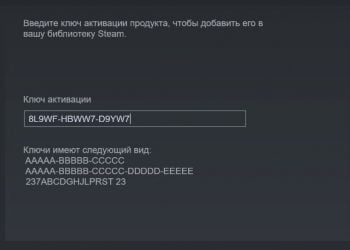
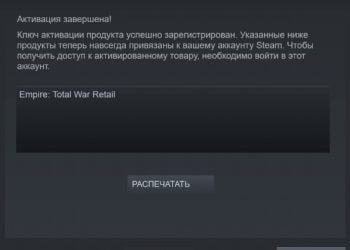
- This will open the window "Product activation". In the "Activation key" field, enter the characters from the archive.


How to activate the key in the Epic Games Store
To enter the key in EGS, perform the following steps:
- Open the launcher and, expanding the profile window, click on "Redeem Code».

- Enter the purchased code. Complete the process by using the "Activate" function.

- You’ll find the game in your profile’s “Library”—in this example, it’s “Wolfenstein: The New Order.”


So far, this is the best option for gaining access to games blocked in Russia. In addition to the games from the list on the site, you can find other interesting offers, including those with game currency or accounts.
FAQ
What should I do if the key does not work or there is an error logging into my account?
- Write to Keysforgamers technical support, whose specialists are always ready to help resolve any problems that arise between the seller and the buyer.
What to do, if there was an error in the order?
- The answer is similar to the first question - just write to Keysforgamers specialists with the exact wording of the request so that they can assess the scale of the problem and start solving it as soon as possible.
What to do, if the wrong region was selected during the ordering process?
- Unfortunately, no one will be able to provide support in resolving this issue, since this technical moment must be monitored by the buyer PERSONALLY. Refunds are not provided for this issue.
What information must be provided when requesting technical support?
- The order number and username are the two most important points that must be recorded when contacting Keysforgamers specialists. Next comes a clearly formulated description of the problem, so that later you do not encounter many clarifying points that can delay the process.
If you have any other difficulties, the support service is always online, so do not be afraid to contact, they will always answer you and try to help.




Hello! Can you tell me, from experience, if WoW Classic can still be paid for in the Russian region, or is it now completely impossible to pay for an account registered in the Russian Federation?
I bought the long-awaited DBD, but the key hasn't arrived for 30 minutes. Everything was accepted and paid for, but the key still hasn't arrived. Is this delay normal?
There may be a technical issue. Try contacting the seller through feedback or contacting the support team. Usually, the order arrives within 5-10 minutes.
I recently bought a game online. They delivered it and helped me install it. I personally like it.
I'm laughing out loud at the author's comments about Difmark's technical support...
Request ID 79982, opened January 31, 2022, everything is described in detail, the DF-keys seller is not responding... as is Difmark technical support
Customer support has already responded and is waiting for you in chat or on Telegram. Your order has been delivered; you can find it on the "My Orders" page or in the chat with the seller.
I confirm that I received a response at 3:03 PM on February 2, 2023, which is today, and I understand it was after your request. Again, the request was from December 31, 2022, which was responded to a month later, and even then, after I contacted you through the affiliate program… Excellent tech support, to be sure.
By the way, they refuse to resolve the issue. I have a screenshot of the product (specifically, Total War Warhammer 3), where the activation region was CIS, EU (now only EU), although they do not claim that CIS was not available at the time of my purchase... they simply regret that the people at SEGA are such bad, but sooner or later everything will work out and I will be able to safely use this key, they say, as soon as it is active in CIS again...
Everything is great, I recommend Difmark to everyone, and if anything happens, contact their tech support {ironic/sarcasm}
P.S.: and yes, I have a typo in my very first post, the application to Difmark is from December, not January, the application is a little over a month old... not Russian Post, but still, so-so
As I understand it, the profit here is minimal in creating a new account, because the Waha series is strictly tied to the purchase of the entire series and previous add-ons
I bought a global key for Ghost Recon Breakpoint, but my USB says it's not available for my region ((( I think it's a waste of money
Try writing to the support team on the website if you definitely purchased the Global version.
We tested it on Steam and EGS, which is why we covered them in the article. You can definitely activate the key here even if the game is unavailable in your region; we've verified this multiple times (that's the whole point of the Difmark website for Russian players).