
The large-scale strategy simulator Europa Universalis 5 offers extensive opportunities for governance spanning periods from the Middle Ages to the Renaissance. While navigating the game's numerous systems, you can often find yourself in a hopeless situation and on the brink of collapse—but console commands come to the rescue, saving you from restarting a multi-hour session.
Like previous installments in the series, EU5 supports cheats via a manually enabled debug mode. This guide will explain how to enable and open the console in both official and unofficial versions, as well as provide a complete list of codes.
Bookmark this article to keep your combinations handy. For easy navigation, use the navigation bar on the left. We're constantly updating this guide, adding new cheats and IDs, and expanding the descriptions of existing ones.
How to use console commands in EU5
To enter and activate cheat codes, you will need to change the game's launch parameters by enabling developer mode.
Steam version of the game
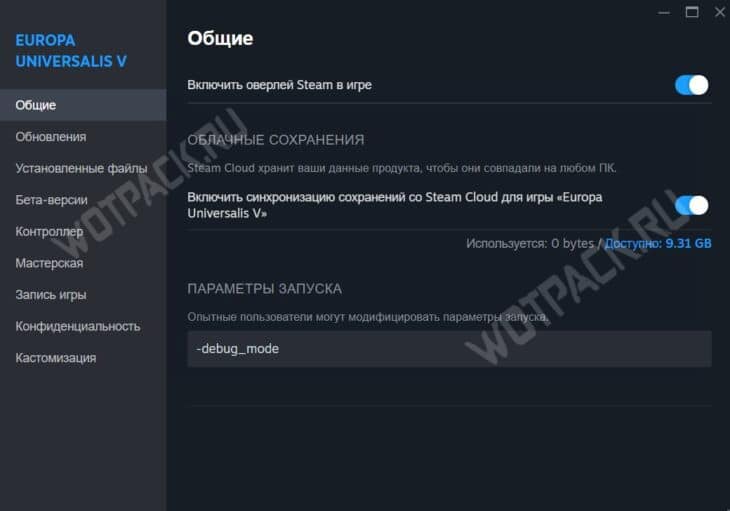
If you're using the Steam version, open the client and, in the Europa Universalis 5 tab, select "Properties." In the window that appears, find the "Launch Options" field and enter the following phrase: -debug_mode.
Other versions of the game
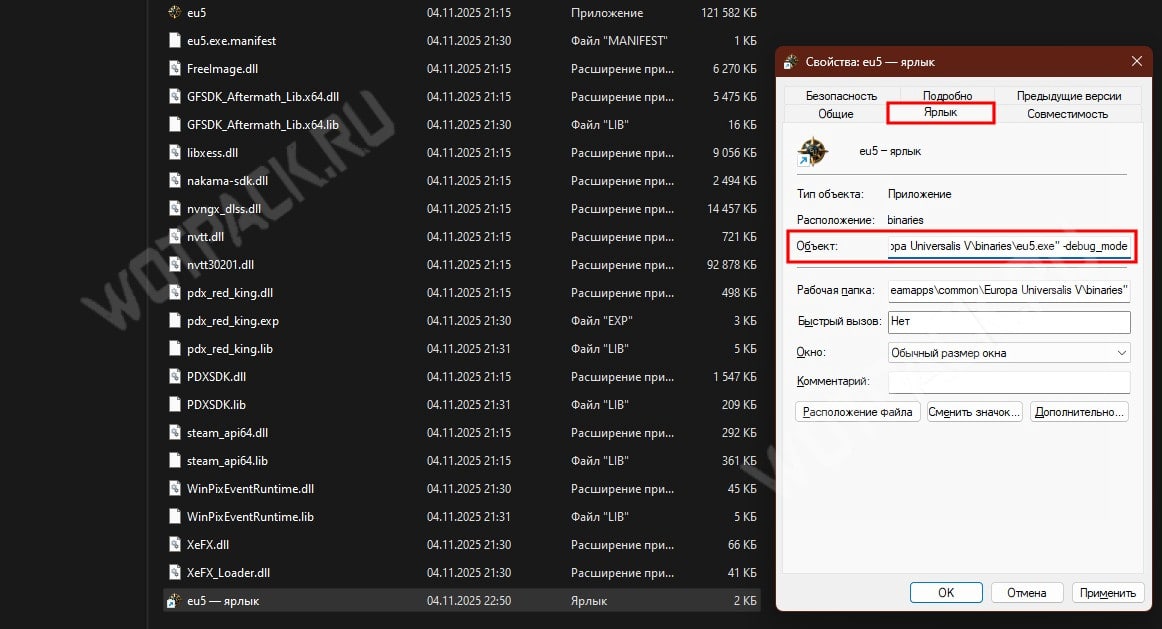
In other cases, follow the steps in the instructions:
- Find label "eu5.exe" or create a new one by navigating to the installation path in the folder binaries with the game.
- Open properties label and go to the tab with the same name. Enclose the path specified in the "Object" line in quotation marks if they aren't present.
- After the quotation marks, add a space and write -debug_modeSave all changes and launch the game using the edited file.
How to turn on the console
With the changed launch parameters, you can immediately call up the console to enter commands using the "tilde" key "Ё/~"You can enter it manually or by pasting it with "Ctrl+C", and press "Enter" to apply it.
Before activating any code, create a backup save of your progress, especially if you are unsure what the cheat will entail.
All cheat codes for Europa Universalis 5
If you want to find out what codes exist, or get a description of how a certain combination works, use the help commands:
| Assigning a console command | Code |
| Displays a complete list of all commands on the screen. | help |
| Displays a description of the command. | help [command] |
| Creates a "console.txt" file with all commands. | helplog |
To avoid having to wade through massive lists and search for the cheats you need, we've grouped codes by topic in the sections below, along with a description of their effects.
Square brackets are used as a more visual explanation when entering combinations remove them and substitute values. For example, you can call the description of the command that adds ducats using help cash.
Tags for all countries
Some codes require a TAG—a unique abbreviation assigned to a specific country on the map. These are listed in the table below.
| ARA | Aragon | KOR | Goryeo |
| ARM | Armenia | LAV | Lavaux |
| TNC | Tenochtitlan | ADH | Ayodhya |
| LGW | Lower Bavaria | SPN | Suphanburi |
| uvv | Upper Bavaria | LIE | Liège |
| BOH | Bohemia | LIT | Lithuania |
| BRA | Brandenburg | LUX | Luxembourg |
| BRB | Brabant | MAC | March |
| BYZ | Byzantium | MAJ | Majapahit |
| CAS | Castile | MAL | Mali |
| CHA | Champa | MAM | Egypt |
| CHG | Chagatai | MEI | Meissen |
| WHO WE | China | MLO | Milan |
| CHK | Cahokia | MOR | Morocco |
| CSU | Kosko | MOS | Moscow |
| DAI | Dai Viet | NAV | Navarre |
| DAN | Denmark | NAP | Naples |
| dhm | Durham | NOV | Velikiy Novgorod |
| DLH | Delhi | NTC | Jimyoin |
| DMS | Desmond | PAL | Palatinate |
| ENG | England | PAP | Rome |
| ERE | Eretnidae | PLE | Pale |
| ETH | Ethiopia | POL | Poland |
| EWY | Evias | POR | Portugal |
| FLA | Flandria | SGB | Balliol |
| FLO | Florence | SCO | Scotland |
| From | France | BEING | Serbia |
| FRI | Frisia | STC | Daikakuji |
| GEL | Geldern | SUK | Sukhothai |
| GEN | Genoa | SWE | Sweden |
| GEO | Georgia | TEU | Teutons |
| GLH | Jochids | THO | Thomond |
| GRM | Germiyan | THREE | Trebizond |
| HAB | Austria | TUR | Ottomans |
| HAI | Eno | ULS | Ulstersk |
| HOL | Holland | RTU | Utrecht |
| HUN | Hungary | VEN | Venice |
| JAP | Japan | VIJ | Vijayanagar |
| CART | Karaman | WLS | Wales |
| CBE | Canem | Zan | Kilwa |
| KHM | Khmers | ZMW | Zimbabwe |
| KNI | Hospitallers |
Basic console commands
Frequent tools for point management, automatic diplomatic successes, and military victories.
"X" refers to a numeric value, "TAG" should be replaced with a universal tag, and "ID" should be replaced with a unique identifier for a smaller object.
| Assigning a console command | Code |
| Adds recruits. | manpower X |
| Adds sailors. | sailors X |
| Adds ducats. | cash X |
| Adds stability points. | stability X |
| Adds exhaustion. | warexhaustion X |
| Adds inflation. | inflation X |
| Adds prestige. | Prestige X |
| Adds karma. | karma X |
| Adds religious influence. | religious influence X |
| Enables or disables instant movement mode. | instantmove |
| Instant success of the siege. | instantsiege |
| Mode without the influence of randomness. | norandom |
| Quick diplomacy mode. | fastdiplo |
| Postpones diplomatic decisions. | delaydiploreply |
| Instant construction. | instant construction |
| Instant state of war. | instantwar |
| Declaring war without parliamentary approval. | instantcasusbelli |
| Instant research. | instant exploration |
| Instant missions. | instantmission |
| When the mode is enabled, all requirements are met. | bypass requirements |
| Removes the fog of war. | removefogofwar |
| Forms an alliance with the state. | form_union TAG |
| The parliamentary meeting concludes with the approval of the topic. | end_parliament_issue |
| Opens the specified area or all territories. | discover_area ID |
| discover_area all | |
| Destruction of all food supplies in markets and provinces. | famine |
| Changes the controlled country to the specified one. | tag TAG |
| Enables or disables artificial intelligence for the region. | ai TAG |
| Clears the list of diplomatic and military targets set by the AI. | clear_ai_objectives TAG |
| Gives the selected unit to the country's disposal. | give_units TAG |
| Kills all the inhabitants of the country. | kill_all_units TAG |
| Sets the satiety value of all villagers to maximum. | resupply_all_units TAG |
| Deals damage to all inhabitants. | damage_all_units TAG |
| Provides a pretext for starting a war. | cb TAG |
| Begins annexation of the country. | start_annex TAG |
| Instant annexation of another state. | annex TAG |
| Siege success in a given region. | win_siege ID |
| Converts the entire population of the region to the state religion. | convert ID |
| Occupation of the country. | occupy_country TAG |
| Conquest of the country. | conquer_country TAG |
Adding points
Increases to all basic indicators are made through short commands with the name of the parameter and the number of points.
| Assigning a console command | Code |
| Increases recruitment. Requires sergeant major construction. | manpower X |
| Adds sailors. Requires building a pier or fishing village. | sailors X |
| Adds ducats. | cash X |
| Adds stability points. | stability X |
| Adds war weariness. | warexhaustion X |
| Adds inflation. | inflation X |
| Adds prestige. | Prestige X |
| Adds karma. | karma X |
| Adds religious influence. | religious influence X |
| Adds Army Traditions. | armytradition X |
| Adds Naval Traditions. | navytradition X |
| Adds government power. | governmentpower X |
| Adds purity. | Purity X |
| Adds honor. | Honor X |
| Adds a sense of doom. | Doom X |
| Adds power to rituals. | ritepower X |
| Adds yanantine. | yanantin X |
| Adds virtue. | righteousness X |
| Adds harmony. | Harmony X |
| Adds self-control. | selfcontrol X |
Global rules
Combinations enable or disable special modes, modifying or speeding up gameplay. For example, with the "instantconstruction" cheat, you no longer have to wait for structures to finish being built.
| Assigning a console command | Code |
| Instant movement. | instantmove |
| Successful siege. | instantsiege |
| Disables the influence of randomness. | norandom |
| Fast diplomacy. | fastdiplo |
| Postpones diplomatic decisions. | delaydiploreply |
| Instant construction. | instant construction |
| Instant state of war. | instantwar |
| Declaring war without parliamentary approval. | instantcasusbelli |
| Instant research. | instant exploration |
| Instant missions. | instantmission |
| When the mode is enabled, all requirements are met. | bypass requirements |
| Removes the fog of war. | removefogofwar |
| Other powers always agree to proposals. | yesman |
| Other powers always refuse. | noman |
| WatchWindows mode. | watchwindows |
| LoadingScreen mode. | loading screen |
| The conquistador's instant success. | instant conquistadors |
| Accelerated rebellions. | fastrebels |
| Disables the possibility of a peaceful settlement. | no_peace_deals |
Foreign policy and conquests
A series of commands for manipulating the world's political map, allowing you to quickly change the status of another power, improve relations, and even force the loan of ducats.
| Assigning a console command | Code |
| Forms an alliance with the state. | form_union TAG |
| Lend funds to the chosen power for the specified period. | lend [country TAG] [amount] [percentage] [term] |
| Declares the state bankrupt. | bankrupt TAG |
| Removes bankruptcy status. | remove_bankruptcy TAG |
| Send spies to the specified country. | spy TAG X |
| Sets the state's opinion of the player to the specified value. | opinion TAG X |
| Adds favor from the specified power. | favor TAG X |
| Adds trust from the said state. | trust TAG X |
| Adds rebellion progress to the region. | rebel_progress ID X |
| Begins annexation of the country. | start_annex TAG |
| Instant annexation of another state. | annex TAG |
| Siege success in a given region. | win_siege ID |
| Occupation of the country. | occupy_country TAG |
| Occupation of various regions by ID. | occupy_location |
| occupy_floodfill | |
| occupy_province | |
| occupy_area | |
| occupy_region | |
| Conquest of the country. | conquer_country TAG |
| Conquering different regions by ID. | conquer conquer |
| conquer_province | |
| conquer_area | |
| conquer_region | |
| Provides a pretext for starting a war. | cb TAG |
| Forces another power to attack. | war_on_player TAG |
| Declaration of war on another power. | declarewar TAG |
| Turns the country into a dependent state. | make_subject [type] [Country TAG] |
| Creates a colony in the province. | colonize ID |
| Creates a colony and a colonial settlement in the province. | colonize_and_finish ID |
| Completes the colonization process in the selected location. | finish_colony ID |
| Completes the process of colonization and settlement creation in all locations. | finish_all_colonies |
| Moves populations from one region to another. The first ID is the origin, and the second is the destination. | move_random_pop ID ID |
| Changes the population in the location. | population ID |
Customizing characters and populations
The codes allow you to fine-tune the skills of your confidants, as well as instantly kill the entire population of an entire empire.
| Assigning a console command | Code |
| Converts the character to the chosen religion. | convert_character [type] [character ID] |
| Kills the character. | kill ID |
| Makes the character become pregnant. | impregnate ID |
| Causes a pregnant character to give birth. | give_birth ID |
| Kills a character controlled by the player. | suicide |
| Adds the ruler trait to a character. | add_random_trait [character ID] |
| Grants the ruler the chosen trait. | add_trait [trait] |
| Gives administrative skill to the character. | set_adm [character ID] [skill] |
| Gives diplomatic skill to the character. | set_dip [character ID] [skill] |
| Gives military skill to the character. | set_mil [character ID] [skill] |
| Gives the selected unit to the country's disposal. | give_units TAG |
| Kills all the inhabitants of the country. | kill_all_units TAG |
| Sets the satiety value of all villagers to maximum. | resupply_all_units TAG |
| Deals damage to all inhabitants. | damage_all_units TAG |
Management of states and regions
A set of cheats for a variety of purposes: allowing you to cause an epidemic, place all types of structures, freeze the sea, or instantly change your government type and cultural values.
| Assigning a console command | Code |
| Changes the controlled country to the specified one. | tag [country TAG] |
| Changes the form of government to theocracy. | change_government theocracy |
| Changes the form of government to a monarchy. | change_government monarchy |
| Changes the form of government to a republic. | change_government republic |
| Changes the state culture. | culture [type] |
| Changes cultural traditions. | cultural_tradition [type] [value] |
| Changes cultural influence. | cultural_influence [type] [value] |
| Sets the social values indicator to the specified value. | set_societal_value [type] [value] |
| Changes the state religion. | religion [type] |
| Adds satisfaction to the classes. | estate_satisfaction [type] [value] |
| Adds gold to the class. | estate_gold [estate type] [quantity] |
| Changes the flag. | set_flag [type] |
| Resets the needs of the population and markets. | economy |
| Destroys all food supplies in markets and provinces. | famine |
| Starts the process of slave trade. | slavery |
| Conducts a slave raid in the selected region. | raid ID |
| Builds all available buildings in the region. | build_everything ID |
| Builds all available buildings in the state. | build_everything TAG |
| Builds all available buildings everywhere. | build_everything all |
| Starts an epidemic. | disease [type] |
| Adds a building to the region. | building [type] ID |
| Completes the construction of all structures. | finish_constructions ID |
| Changes the garrison. | change_garrison ID |
| Freezes the sea space. | freeze ID |
| Causes ice to melt. | thaw ID |
| Adds pirates to the specified zone. | pirate ID |
| Adds Imperial Authority to the Holy Roman Empire. | imperial_authority X |
| Starts a rebellion in the selected country. | revolt [rebel ID] |
| Shows monthly population statistics for the location. | tick_population ID |
| Changes the owner's control. The value must be between 0.0 and 1.0. | change_control ID X |
| Changes the winter level. The value must be between 0 and 3. | change_winter ID X |
| Converts the entire population of the region to the state religion. | convert ID |
| Changes the weather in the region. | Weather ID front |
| weather ID cyclone | |
| weather ID tornado | |
| Opens the specified area. | discover ID |
| Opens all territories. | discover all |
| The parliamentary meeting concludes with the approval of the topic. | end_parliament_issue |
| Changes the parliamentary debate topic. Topics can be found in the document "parliament_l_russian." | parliament_issue [subject] |
| Drops parliamentary demands. | reset_agendas |
| Enables or disables artificial intelligence for the region. | ai TAG |
| Clears the list of diplomatic and military targets set by the AI. | clear_ai_objectives TAG |
| Starts the event. | event [event ID] [target] |
| Changes the dynasty in the country. | change_dynastic_name TAG |
| Removes a region from an international union. | remove_location_from_all_ios ID |
| Changes the era to the selected one. | age [TAG era/century] |
| Triggers a certain situation. | situation [type] |
| Triggers a situation from the monthly category. | monthly_situation |
| The disaster begins. | disaster [type] |
| Changes the date to the selected one. | change_date [year] |
| Adds progress towards the implementation of the institution in the state. | add_institution_progress [type] [TAG] [value] |
| Shows dynasties in each country. | dynasties_report |
| Shows created states without improvements. | formable_report |
| Shows the number of unique content by tags. | content_report |
| Checking for errors in sea zones. | seazone_report |
| Reports the base maintenance cost of all buildings. | building_report |
| Checking all areas for problems. | area_report |
| Checking tooltips. | mapmode_report |
| Displays information on regions with overpopulation. | overpopulation |
Developer Tools
Combinations for checking the functionality of in-game functions, viewing statistics, and changing artificial intelligence parameters.
| Assigning a console command | Code | Argument |
| Adds a sub-unit. | add_subunit | |
| Recalculates modifiers in the location. | recalc_loc | [ ] |
| Outputs missing locations to the error log by language or dialect. | location_language_loc | [ ] |
| Overwrites the display names of all dynasties, characters, and locations with this dialect. | dialect_override | [ ] |
| Dumps the Country of Arms (COA) representation to the error log. | strain | [ ] |
| Exports coats of arms (COA) starting with this string to the documents folder. If the argument is "random," 100 random coats of arms will be generated based on the player's current country. If the string is empty, all coats of arms in the game will be displayed! | coa_export | [ ] |
| Outputs all locations without population to the error log. | no_owner_pops | |
| Displays building errors that exceed the maximum level in the log. | buildings_over_limit | |
| Shows the queue of buildings. | building_queue_stats | [ ] |
| Launches the selection of expansion targets for the country. | run_select_expand_objectives | [ ] |
| Shows which buildings are in the construction queue. | building_queue_buildings | [ ] |
| Shows the top 5 candidates in the construction queue. | building_queue_top | [ ] |
| Clears all candidates in the build queue. | building_queue_clear | [ ] |
| Shows the number of buildings. | number_of_buildings | [ ] |
| Checks if any map mode has a missing hint. | mapmode_report | |
| Checks if the icon database has a missing tooltip. | icon_report | |
| Checks if there are any invalid resources in locations. | bad_goods | |
| Displays locations with overpopulation. | overpopulation | |
| Checks whether all social values have sufficient influence. | societal_values_report | |
| Checks the correctness of the river map. | river_validation_report | |
| Displays information about the population. | write_popdata | |
| Writes location data in CSV format. | print_location_list | |
| Writes the current world map to a file. | printmap | [ ] [ ] [ Should render flat (optional)] |
| Toggles the settings editor. | setup_editor | |
| Toggles the population editor. | pop_editor | |
| Switches CD editor population. | cd_pop_editor | |
| Toggles the war viewer. | war_viewer | |
| Toggles the AI currency viewer. | ai_currency_viewer | |
| Toggles the AI diplomatic target viewer. | ai_diplomatic_objectives_viewer | |
| Toggles the AI target viewer. | ai_targets_viewer | |
| Toggles the ports editor. | port_editor | |
| Toggles the institute editor. | institution_editor | |
| Toggles the road editor. | road_editor | |
| Shows all players on the server. | players | |
| Excludes the player with the specified name. | kick | [ ] |
| Creates a new culture for the player with the specified name. | new_culture | [ ] |
| Unites a cultural group. | merge_culture_group | [ ] |
| Updates the number of characters for the player. | update_characters | |
| Creates a character. | create_character | [ ] [lowborn/random/new] |
| Creates an artist. | artist | [ ] |
| Creates a work of art. | workofart | [ [ [ ]]]] |
| Changes policy. | [ ] | |
| Gets the distance to the border between the current and the specified country. | border_distance | [ ] |
| Receives diplomatic actions. | diplomats | [ ] |
| Accumulates goods. | stockpile | [ [ ]] |
| The player's religion gains the reform desire. | reform_desire | [ ] |
| Adds the main location. | add_core | [ ] |
| Adds naval presence to the sea zone. | maritime_presence | [ ] |
| Receives research progress. | add_research | [ ] |
| Shows a list of all bankrupt countries. | list_bankruptcies | |
| Shows a list of all countries with high debt. | list_high_debt_countries | |
| Shows diplomacy statistics. | show_diplomacy_stats | |
| Launches collection of economic statistics. | run_economy_stats | |
| Shows economic statistics. | show_economy_stats | |
| Shows the country's savings regime. | show_saving_mode | [ ] |
| Shows the level of threat that the second country poses to the first. | calc_threat_level | [ ] |
| A command for simple code testing. | codetest | |
| Researches all technologies. | research_all | |
| Completes the progress of the current religious focus. | finish_current_religious_focus | |
| Integrates all provinces. | integrate_all | |
| Adds antagonism focused on the capital or specified location. | antagonism | [[ ] ] |
| Completes a resolution in an international organization. | finalize_resolution | [ ] |
| Creates an alliance with another country. | create_pu | [ ] |
| Explores a specific discovery. | research | [ ] |
| Accepts all active institutions. | embrace_all | |
| Prints debug event counters. | event_counts | |
| Starts a set of animations by name. | trigger_animations | |
| Performs the effect. | effect | [{effect script}] |
| Executes the effect file from the /run folder. | run | [{effect file}] |
| Tests the trigger script. | trigger | [{trigger script}] |
| Clears the console. | clear | |
| Moves the camera to the location. | Camera.Goto | [ ] |
| Copies/shows the character's ADN. | copy_dna | [ ] |
| Causes the player to lose to the target country. | lose_to | [ ] |
| Shows the oos_prompt window. | oos_prompt | [ ] |
| Dumps OOS information. | oos_dump | |
| Prints the current randomlog. | print_randomlog | |
| Forces desync by changing the randomness counter. | force_oos | |
| The host is forcing resynchronization in multiplayer. | force_resync | |
| Recalculates cached data in the game state that is not saved in the save. | recalc_cached_data | |
| Recalculates cached data related to the population of the player's country. | update_pop_cache | |
| Makes time flow smoothly, ignoring pause (animation works when paused). | ignore_paused_time | [ ] |
| Overrides the time graphics scale depending on the game speed. | override_scale_time | [ ] |
| Ignores pause and sets time scale = 1.0. | debug_animation_time | |
| Changes the level of destruction (value from 0.0 to 1.0) | change_devastation | [ ] |
| Reloads terrain2 textures. | reload_terrain2_materials | |
| Prints debug information about illustrations. | print_selected_illustration_info | [eventidverbose] |
| Outputs debug information about the image selection in an event illustration. | print_selected_images_info | [eventid] [verbose] |
| Checks locators within the province. | MapObjects.CheckLocators | [[optional] numbers of pixels to search for other location] |
| Displays the biome of the targeted location. | PrintLocationBiome | [[optional] location id to print biome for] |
| Lists DHEs enabled for the tag. | list_dhe_for | |
| Prints a list of all circuits used in city models. | Cities.PrintUsedSchematics | |
| Generates debug lines for standard locator placement. | MapObjects.DebugDefaultLocatorTransforms | |
| Reloads pin collections. | reload_pin_collections | |
| Creates a pattern of the specified type at each location (can be limited by fov/fow/player). | spawn_in_every_location | |
| Exports event parsing (triggers and probabilities) for on_action to the error log. Use "lean" for a simplified version. | event_probabilities | [ [lean]] |
| Saves PNG maps with a specific color mode and size. | Map.SavePNGScaled | [ ] [ ] [ Should render flat (optional)] |
| Opens the inspector for the player's country. | inspect_player_country | |
| Copies the cursor position to the clipboard. | copy_mouse_pos | |
| Dockable unit viewer window. | unit_viewer | |
| Forces debug age for all units on screen. | unit_age | [ ] |
| Runs tests of graphic locations. | start_location_gfx_test | [ ] |
| Completes tests of graphic locations. | stop_location_gfx_test | |
| ECS dockable scene window. | ecs_scene_viewer_dockable | |
| Opens the portrait editor. | portrait_editor | |
| Clears the portrait cache and refreshes all portraits. | Portrait.ClearCache | |
| Model import browser. | mesh_importer_browser | |
| Import models. | mesh_importer | |
| ECS Dependency Graph Editor. | ecs_dependency_editor | |
| Initialization Flow Dependency Editor. | init_flow_editor | |
| Update Stream Dependency Editor. | update_flow_editor | |
| Rebuilds all boundaries. | Adjacencies.Rebuild | |
| Creates a line between two positions. | spawnline | [ ] [ (no spaces)] [ (no spaces)] |
| Clears lines. | clearlines | |
| Runs the entity schema with the given parameters. | spawn_schematic | [schematic name] |
| Removes all debug entities (created via spawn_schematic). | clear_spawned_schematics | |
| Runs the ECS rendering benchmark. | Ecs.RunRenderingBenchmark | [Schematic name] [Number of instances] [Duration (s)] |
| Creates an object at the cursor position. | spawnentity | [ ] [ (optional)] |
| Creates an object by XY coordinates. | spawnentity_at | [ ] [x] [y] [ (optional)] |
| Shows a list of nodes of the specified entity. | list_entity_nodes | [{entity name}] |
| Shows a list of submeshes of the specified entity. | list_entity_submeshes | [{entity name}] |
| Cleans up entities created by the spawnentity command. | clearspawnedentities | |
| Generates locators for map objects. | MapObjects.GenerateGameLocators | [ ] [ (optional)] |
| Prints debug information about map objects. | MapObjects.Debug | |
| Prints debug information about the camera. | Camera.Debug | |
| Saves the camera position. | Camera.Save | |
| Loads the camera position. | Camera.Load | |
| Sets the camera transformation. | Camera.SetTransform | [X] [Y] [Z] [Zoom] [Pitch] [Yaw] |
| Saves PNG maps with a specific color mode. | Map.SavePNG | [ ] [ ] [ Should render flat (optional)] |
| Reloads the terrain or associated resources. | terrain2.reload | [data source ('empty' or 'dataset')] |
| Opens the save analyzer. | save_game_analyzer | |
| Opens the Entity Designer preview. | entity_designer | |
| Opens the Entity Designer node editor. | entity_designer_node_editor | [Name of the schematic to open] |
| Update graph editor. | update_graph_nodeeditor | |
| Opens the animation editor. | animation_editor | |
| Opens the scene editor. | scene_editor | |
| Dockable entity editor. | entity_editor | |
| Dockable GUI animation curve editor. | gui_animation_curve_editor | |
| Dockable GUI animation editor. | gui_animation_editor | |
| Creates a tweaker interface. | tweak | |
| Exports all available tweak parameters to the user file. | dump_tweakables | |
| GUI data profiler. | gui_data_profiler | |
| Dockable log viewer. | log_viewer | |
| Dockable log status window. | log_status | |
| Shows the script profiler GUI. | Script.Profiling.Gui | |
| Displays documentation for scripts. | script_docs | |
| Starts recording script profiling. | Script.Profiling.Start | |
| Stops profiling recording. | Script.Profiling.Stop | |
| Restarts script profiling. | Script.Profiling.Restart | |
| Shows active DLC. | Session.GetEnabledDLCs | |
| Starts shader debugging. | shader_debug | |
| Syncs cloud saves (for POPS/PDX SDK). | savegames.sync_cloud_files | |
| Particle editor. | particle editor | |
| Dockable shader editor. | shader_editor | |
| Compound Node Editor. | compound_nodeeditor | |
| Opens the data type browser. | data_types_explorer | |
| Render command viewer. | drawcmdsviewer | |
| Skin editor. | tools.skins | |
| Takes a screenshot. | screenshot | |
| Creates a settings window (you can specify a category). | settings | |
| Texture viewer. | textureviewer | |
| List of textures. | texturelist | |
| Requests a new inventory state. | sdk.testloyaltyrefresh | |
| List of all items in the inventory. | sdk.inventorylist | |
| Sends a campaign event for a test item to Marius. | sdk.testloyaltyinventory | |
| Checks if telemetry is enabled. | sdk.istelemetryenabled | |
| Toggles random log. | RandomLog | |
| Measures average/min/max frame time and outputs the result to debug.log. | measure_frame_time | [“start” or “stop” measuring] |
| Toggles IO statistics. | io_stats | |
| Resets IO statistics. | io_stats.Reset | |
| Toggles network statistics. | net_stats | |
| Resets network statistics. | net_stats.Reset | |
| Toggles memory statistics. | memory_stats | |
| Resets memory statistics. | memory_stats.Reset | |
| Toggles 3D statistics. | 3dstats | |
| Toggles 3D zone statistics. | 3dstats.EnableGfxZoneStats | |
| Toggles texture statistics. | 3dstats.EnableTextureStats | |
| Toggles descriptor statistics. | 3dstats.EnableDescriptorStats | |
| Toggles the MipLevel debugging tool. | MipLevelDebugTool | |
| Limits the frame rate. | Graphics.CapFramerate | |
| Outputs GUI animation timeline system statistics to debug.log. | GUI.AnimationTimeline.LogStats | |
| List of audio events. | audio.list_events | |
| Plays an audio event. | audio.play_event | [Audio event] |
| Shows the current CPU usage. | audio.cpu_info | |
| Sets the Wwise RTPC parameter. | audio.set_rtpc | [RTPC name] [RTPC value] |
| Sets the Wwise state. | audio.set_state | [State name] [State value] |
| Sets the Wwise switch. | audio.set_switch | [Switch name] [Switch value] |
| Completely disables the data system in localization. | Localization.ToggleSkipDataSystemInLocOutput | |
| Includes the localization key in the output. | Localization.ToggleIncludeKeyInLocOutput | |
| Shows only the localization key in the output. | Localization.ToggleOnlyKeyInLocOutput | |
| Tells which graphics renderer is used. | rendertype | |
| Enables texture debug mode. | Debug.TextureMode | [Name of debug mode] |
| Toggles vertical synchronization of the main swapchain. | vsync | |
| Queries/sets swapchain buffers. | swapchain.buffers | |
| Reloads textures. | gfx.reloadtexture | |
| Generates a settings file with all parameters, including unchanged ones. | FullSettings | [Optional file where the full settings will be saved] |
| Sets or gets the number of task threads. | Threading.TaskThreadCount | [The number of task threads] |
| Lists all log categories and receivers. | log | [Various, see below] |
| Clears the error.log and resets the error counter. | Log.ClearErrorLog | |
| Clears all logs. | Log.ClearAll | |
| Starts outputting performance data to profiling.log. | log_ticktask_performance | |
| Outputs missing AI currency modifiers to the log. | ai_currency_misses | |
| Opens the tick task graph. | TickTask.Graph | |
| Opens the tick task graph. | TickTask.List | |
| Execution flow graphs. | write_execution_flow_graphs | |
| Simulates a crash (game closing). | CrashReporter.SimulateCrash | |
| Removes local crash dumps older than X days. | CrashReporter.DeleteCrashData | |
| Creates a minidump. | minidump | [file path] |
| Selects the active graphic skin. | gfx.skin | |
| Creates a dockable window. | Dockables.Create | [Dockable name] |
| Creates a new custom layout based on the current one. | Dockables.CreateUserLayout | [Dockable layout name] |
| Saves the current layout as a custom one. | Dockables.SaveUserLayout | [Dockable layout name] |
| Removes a custom layout. | Dockables.DeleteUserLayout | [Dockable layout name] |
| Shows the existing layout, hiding the current one. | Dockables.ShowLayout | [Dockable layout name] |
| Hides any open dockable window. | Dockables.HideLayout | |
| Shows the layout manager. | Dockables.ShowManager | |
| Toggles the map editor. | map_editor | |
| Plays an audio event on a persistent object. | AudioPersistentObjectManager.PostAudioEvent | |
| Enables achievement debugging mode. | Debug.Achievements.ToggleDebug | [ ] |
| Enables achievement debugging mode. | Debug.Achievements.ListAll | [ ] |
| Blocks all achievements again. | Debug.Achievements.ResetAll | |
| Reloads localization files and switches the language. | switchlanguage | [language name] |
| Reloads resources. | reload | [file name] |
| Shows time. | team | |
| Causes the application to crash. | crash | |
| Toggles debug mode. | debug_mode | |
| Toggles release mode. | release_mode | |
| Creates a test widget (default gui/test_gui.gui, test_window). | GUI.CreateWidget | [File name] [Widget name] |
| Creates a test dockable widget. | GUI.CreateDockable | [File name] [Widget name] [Dockable id. If doesn't exist, it will be registered] |
| Clears the test widget. | GUI.ClearWidgets | |
| Enables/disables pseudo-localization of text widgets. | pseudoLoc | |
| Unloads registered data types. | dump_data_types | |
| Shows the object browser window. | explorer | |
| Resets the position and settings of the object browser. | explorer_reset | |
| Stops the current music track. | Music.StopTrack | |
| Shows or sets the current pause_factor of the music system. | Music.PauseFactor | |
| Plays the specified music track. | Music.PlayTrack | [ ] |
| Resets the music system. | Music.Reset | |
| List of all music tracks. | Music.ListTracks | |
| Prints the version to the console and the game log. | version | |
| Forces the game over screen. | endgame | |
| Scrolls forward the specified number of days. | tick_day | [number of days] |
| Loads the game state from a save. | load | [file name] |
| Checks that saving and loading is correct. | test_save | |
| Saves the current state of the game. | save | [file name] |
| Saves the current replay. | save_replay | [file name] |
| Starts observing the game. | note | |
| Enables observation windows. | watch | |
| Shows errors in the log. | error | |
| Clears UI pools. | clear_pools | |
| Clears the map (for debugging only). | clear_map | |
| Shows the game log. | gamelog | |
| Displays the processing time for each action type. | action_timer | |
| Changes the player's country to the specified one (by unique prefix). | t | [ ] |
| Enables/disables "brainless" AI for the state. | braindeadai | [ ] |
| Establishes a subordinate position for the state. | subject_stance | [ , ] |
| Recalculates AI strategy for all countries. | ai_recalc_strategy | |
| Starts tactical AI without execution. | ai_tactical_dryrun | ['hourly'/'daily', ] |
| Launches tactical AI and displays results. | ai_tactical_print | ['hourly'/'daily', ] |
| Launches tactical AI for one country. | ai_tactical_execute | ['hourly'/'daily', ] |
| Triggers daily AI tick without execution. | ai_daily_dryrun | [ ] |
| Runs a daily AI tick and displays the results. | ai_daily_print | [ ] |
| Runs daily AI tick. | ai_daily_execute | [ ] |
| Triggers a monthly AI tick without execution. | ai_monthly_dryrun | [ ] |
| Launches monthly AI tick. | ai_monthly_execute | [ ] |
| Runs the monthly AI tick and displays the results. | ai_monthly_print | [ ] |
| Recalculates AI peace agreements. | ai_recalc_peace_deals | |
| Tester mode. | enable_all_commands | [ ] |
| Recalculates all trade route caches. | recalc_trade_path_cache | |
| Estimates additional currency for AI. | ai_currency | [ , , ] |
| Estimates additional monthly currency for AI. | ai_monthly_currency | [ , , ] |
| Transfers the selected unit to the target country. | mapmode | [ ] |
| Destroys the unit with the specified ID (or the selected one). | kill_unit | [ ] |
| Raises all the militias in the world. | world_levies | |
| Runs estate logic for debugging. | debug_estate_logic |
With cheat modes and codes in Europe Universalis 5, you can fine-tune the world map and correct poor decisions without reversing your progress. This guide is currently being updated—we'll update the descriptions of combinations soon.





add_research — Speeds up the current Research
integrate_all — Integrates all provinces
I entered -Debug_mode into the line, and the console won't open with the tilde key anymore. Province and character information appears on a pink background, but the console won't open. How can I fix it?
It's a bug, restart the game and everything will be fine.
Hello. Could you tell me what could be the cause? My logs folder in my documents keeps growing until I run out of disk space.
Where can I get tags and codes? For example, I need a religion tag. Where can I get it?
After entering the command, press tab and a list will be shown.
You write the name of the region - it's the wrong name, what's the joke?